Pages

Local Apple Support

Apple Bytes: 

Oak Run residents who are new to Apple or have a new Apple device can get help with setup and proper usage of their device. CTC, Inc. members will assist you in learning your Apple product.

Contact oakrunaug@gmail.com to get support for Apple Watch, iPhone, iPad, iPod and Mac, but not for repairs. Best Buy in Ocala is an authorized Apple repair service.

Your request should include the type of device and the specific issue you are having as well as your name and phone number.

December Meeting Presentations

At the December 18 meeting there were two short presentations.

First was a discussion by Kathylee Johnson about the USPS Informed Delivery app. You can find out more and access it from your browser HERE or download the app for use on these platforms:


Second was a discussion by Bob Kenlay about the end of support for Windows 7. Microsoft will no longer provide updates for the operating system as of Jan. 14, 2020.

Don't worry, your old machine won't quit working after that date. It just means it will become more vulnerable to exploitation by the bad guys since Microsoft will quit patching security flaws. Be careful and keep doing backups of your programs and data.

If you would like to ask questions or add to the discussion please use the comments feature of this post, below.

Executive Board Minutes


Computer Technology Club, Inc. – Executive Board Minutes
Dec 13, 2019

Alan Marcus, President, called the meeting to order at 9:00AM. Members in attendance: Bob Leiner, Jim Trimboli, Bob Kenlay, Ron Kenyon, Linda Tingley, Don Forgette, Bill Balch, Bob Roesener, Bill Cahill, Steve Maly, Gail Marcus and Alan Marcus.

Secretary’s report read by Bob Kenlay. No corrections or additions necessary.

Jim Trimboli read the Treasurer's Report. The current balance is $1206.17. Jim Trimboli reported on a new membership application form and new members to volunteer for jobs at the monthly meetings.

Bob Kenlay made the motion to give 10 gift cards at $10 each at the next meeting. Linda Tingley seconded the motion. The motion was passed.

Linda Tingley reported on the food for the Holiday party.

Future meeting topics:
Dec 18 -  Holiday Party , “USPS Mobile App” by Kathylee Johnson
“End of Windows 7 support” by Bob Kenlay
Jan 22 - "4 Years Experience Owning An Electric Car" by Alan Marcus
Feb 19 - "Google Drive and Apps" by Phil Davis, Ocala Mac Users Group
Mar 18 - "Resolving Senior Scams" by Doug Hart, Seniors vs Crime Project
The meeting adjourned at 9:35AM.

Respectfully submitted,
Bob Kenlay, Secretary

Deleting Gmail Contact

Here's how to delete a contact in Gmail:    
  1. Open Gmail in your browser
  2. In the upper right corner of the page (not the header) hover your mouse pointer over the grid of 9 dots and it will say "Google Apps"
  3. Click on the dots to open the menu, then scroll until you see the "Contacts" icon, if it doesn't show, you may have to scroll to the bottom of the menu and click on "more" to see all the apps
  4. Click on the "Contacts" icon and a new tab should open in your browser
  5. Find the address you want, click on it and it will open the contact details
  6. In the upper right corner of the details page click on the 3 vertical dots and select "Delete"
  7. Click "Delete" again in the little pop-up window
That's it. Good-bye contact.

No email

Tech News and Views

A resident recently brought his computer to me to have it repaired. It seems that he was unable to access his email. He thought that something was wrong with the computer and that the machine had a virus or some other problem.

I tried to access his email from a different computer, but couldn't access the email either. He assured me that the username and password were correct.

I called his provider, Atlantic.net, and was told that they shut down an account if it is more than 90% full of emails. They granted access to his account and I went back to look at his emails. He had received 3 warnings that the account would be shut down if he didn't delete some of the emails.

He evidently never read the emails or perhaps ignored them. Here was the warning:

Your mailbox is now 90% full, please clean up some mails to prevent locking of your inbox. Should your mailbox reach 100% capacity, your email account will automatically cease to receive emails until inbox space has been freed up. Atlantic.Net Automated Notification System Tel: 800.540.4686 Email: support@atlantic.net www.Atlantic.Net

The moral of this story is: Read your emails and follow instructions from your provider.

November Meeting Presentation

The November 20 meeting presentation was "Apple Watch" by Chris Kilbride.

You can view a PDF version of Chris's slideshow on the Resource Links tab (above). When the page opens, scroll down to the 'Class, Lecture and Meeting Presentations' section (#4) and click or tap on the link.

If you would like to ask questions or add to the discussion please use the comments feature of this post, below.

New to Mac?

Apple Bytes: 

If you are planning to buy or recently purchased a Mac computer here are a couple of links that may help you get started, especially when switching from Windows.


Executive Board Minutes


Computer Technology Club, Inc. – Executive Board Minutes
Nov 8, 2019

Alan Marcus, President, called the meeting to order at 9:00AM. Members in attendance: Bob Leiner, Jim Trimboli, Bob Kenlay, Ron Kenyon, Linda Tingley, Don Forgette, Bill Balch, Bob Roesener and Alan Marcus.

Secretary’s report read by Bob Kenlay. No corrections or additions necessary.

Jim Trimboli read the Treasurer's Report. The current balance is $1083.17. Jim Trimboli reported on a new membership application form that will ask new members to volunteer for jobs at the monthly meetings.

The CTC Board agreed to give 5 gift cards at $10 each at the next meeting.

Alan Marcus reported that the Holiday party gifts have been received.

Linda Tingley will purchase the food for Holiday party.

Alan Marcus reported that Bill Cahill will not serve as the Vice President next year.

Future meeting topics:
Nov 20 - “Apple Watch” by Chris Kilbride, Ocala Mac User Group
Dec 18 - Christmas Party, “USPS Mobile App” by Kathylee Johnson
“End of Windows 7 Support” by Bob Kenlay
Jan 22 - "4 Years Experience Owning An Electric Car" by Alan Marcus
Feb 19 - "Google Drive & Apps" by Phil Davis, Ocala Mac Users Group
The meeting adjourned at 9:25AM.

Respectfully submitted,
Bob Kenlay, Secretary

Don't update the firmware on your printer

Tech News and Views

If it's not broke ... don't fix it. Consumers are losing literally millions a year because they're "Locked In". Don’t update your Printer Firmware or it could cost you. Manufacturers, such as Lexmark, HP, Brother and Canon use "Firmware" to control your printing supplies and options.

The printer manufacturers, Lexmark, HP, Brother and Canon are continuing to modify the "Firmware" (Firmware controls the functions of a printer's features) you use to prevent you from choosing the origin and type of the supplies you use. Don't permit them from dictating what you purchase and how much you pay.

Most Original Equipment Manufacturers (OEMs) suggest you to set your printer to download firmware updates and install them automatically. We at Priceless Ink & Toner suggest you to change the setting disallowing automatic updates. This will allow you to use our high quality compatible and re-manufactured printer supplies and reduce your printing costs. Otherwise you will only be able to use the original (OEM) printer cartridges.

Once the firmware has been updated it is not easy and also very time consuming to roll back to the older version that worked with the compatible and re-manufactured printing cartridges. After all if you're happy with how your device is performing, there is usually little point in rushing to install the newer firmware that could cause you hours of problems or even calls to an expensive helpline.

New use for old cell phones

Tech News and Views

My Tracfone cell phone overheated and LG said the battery was bad. Since the phone was under warranty, I got ready to send it back to Tracfone, but then I wondered, will I lose all of my apps and contacts.?

I did some research and found that you can easily connect a cell phone to a computer and copy all the info, apps and contacts, to a place of your choice. I copied the info to the computer's desktop. Then, I reset the phone to wipe it clear before returning it to Tracfone.

I then copied the files from the desktop to an old cellphone that no longer had phone service, but which easily took in all the apps and contacts.

Guess what! The old phone does everything but make calls. When on Wi-Fi, the old phone can connect with my Tesla, run my Roomba vacuum, take pictures, connect to my Google calendar, calculate, play music, show YouTube videos, run speed tests, play solitaire, etc. etc. etc.

The moral of this story is, don't throw out that old cell phone. You may find it very useful.

Executive Board Minutes


Computer Technology Club, Inc. – Executive Board Minutes
Oct 11, 2019

Alan Marcus, President, called the meeting to order at 9:00AM. Members in attendance: Bob Leiner, Jim Trimboli, Bob Kenlay, Ron Kenyon, Linda Tingley, Don Forgette, Bill Balch, Bill Cahill, Bob Roesener and Alan Marcus.

Secretary’s report read by Bob Kenlay. No corrections or additions necessary.

Jim Trimboli read the Treasurer's Report. The current balance is $1184.39.

Bob Kenlay made the motion to give 5 gift cards at $10 each at the next meeting. The motion was seconded by Linda Tingley. The motion was accepted.

Alan Marcus presented a pen light, laser light, stylus and pen as a Holiday party gift. Bob Kenlay made a motion to order 4 boxes (96 pens) at $1 each. The motion was seconded by Jim Trimboli. The motion was accepted.

Linda Tingley will purchase the food for Holiday party. Bob Kenlay will contact the “Director on Duty” to open the kitchen and will prepare the coffee.

Ron Kenyon will report on the scanning of members’ badges at a future meeting.

Future meeting topics:
Oct 16 - “VOIP Technology for Hearing Impaired” by Susan Richardson
Nov 20 - “Apple Watch” by Chris Kilbride of Ocala Mac User Group (OMUG)
Dec 18 - Christmas Party, US Postal Mail app by Kathylee Johnson
It was agreed that the Computer Technology Club, Inc. will provide assistance to any residents with entering of data into computers for the new Envera Security gates.

The meeting adjourned at 9:40AM.

Respectfully submitted,
Bob Kenlay, Secretary

And You think your computer problems are big ones!

Tech News and Views

Here's what happens when computer systems are not backed up.

The "Robbin Hood" ransomware attack against Baltimore City has thus far cost the city over $18 million—a process made much more expensive by the widespread absence of data backups or any sort of disaster recovery planning. Over the summer, temporary workers were brought in to replace hard drives and monitors on affected computers, and new servers were purchased to replace those affected by the ransomware.

Amazon Could Be Your Healthcare Provider

The tech giant is looking to change the $3.7 trillion healthcare industry as we know it. Amazon Care has real potential to disrupt the system. Amazon.com has become a trillion-dollar company for one reason above all others: its strength as a disruptor.

Starting out with traditional retail, Amazon has waged war on established industries including book publishing, supermarkets, enterprise computing, cable TV, and logistics. Now, healthcare seems to be securely in its sights.

For a while, Amazon's intention to disrupt healthcare has been coming into focus. The company acquired online pharmacy PillPack last June and launched a joint venture last year with JPMorgan Chase and Berkshire Hathaway that is focused on health insurance. But Amazon just made its biggest move yet to break into the $3.7 trillion healthcare industry.

It just introduced Amazon Care, a virtual and in-person clinic currently only available to Amazon employees in Seattle and their families. The service provides help with issues like colds and infections, preventive-care visits, and tests for things like sexually transmitted infections. Amazon is partnering with Oasis Medical, a family practice clinic in Seattle, to provide the service.

Though this is just a pilot program for now, it's clear from the company's history where it's going with Amazon Care. It's also evident why Amazon has a better chance of disrupting the industry than anyone else does.

New products coming without complete instructions

Tech News and Views

A club member recently told me that her printer, which she had used for years, suddenly would not turn on.  I told her that it sounded to me like the printer must be plugged in to a switched outlet, and when the switch is off the printer is off. She didn't think it was, and went out and purchased a new HP printer. I installed the new printer, but then suggested that she plug the old printer into another outlet. Miraculously, the printer turned on. The woman said she had never moved any plugs, but then realized her son had been using his computer and other equipment in the room and may have moved the plugs. Think of this story if you suddenly find some equipment that will not turn on.

Since I had installed many printers I had little difficulty in getting the woman's new printer going, but users should be aware that many new products are coming with very sparse instructions, and newbies are going to have a difficult time installing and using the printers because of the lack of documentation and will probably need help from the get go.

New products used to come with install CDs. Since manufacturers are no longer including CD drives in most computers, the install information and printer drivers are all online. If you have a slow computer, it may take what seems like forever to download the printer drivers.

The printer in question had no instructions regarding the installation of ink cartridges, no information on installation of the printer, no information on where the paper was to be inserted, no information on opening the tab to prevent paper from shooting out of the printer and the only documentation was about warranty info and safety.

It may pay to do some research to find out who has printers with complete documentation.

September Meeting Presentation

The September 18 meeting presentation was "Digital Estate Planning" by Phil Davis.

You can view a PDF version of Phil's slideshow on the Resource Links tab (above). When the page opens, scroll down to the 'Class, Lecture and Meeting Presentations' section (#4) and click or tap on the link.

If you would like to ask questions or add to the discussion please use the comments feature of this post, below.

Executive Board Minutes


Computer Technology Club, Inc. – Executive Board Minutes
Sept 13, 2019

Alan Marcus, President, called the meeting to order at 9:00AM. Members in attendance: Bob Leiner, Jim Trimboli, Bob Kenlay, Ron Kenyon, Linda Tingley, Don Forgette and Alan Marcus.

Secretary’s report read by Bob Kenlay. No corrections or additions necessary.

Jim Trimboli read the Treasurer's Report. The current balance is $1156.39.

Jim Trimboli will give the names of the monthly volunteers to Alan Marcus during the meeting so that Alan can give them a recognition of “Thanks” for their service.

Jim Trimboli made the motion to determine the number of gift cards and the amounts of each. It will be determined at each Executive Board meeting what that will be for the next Regular Club meeting. The motion was seconded by Bob Kenlay. The motion was accepted.

Bob Kenlay made the motion to give 5 gift cards at $10 each at the next meeting. The motion was seconded by Linda Tingley. The motion was accepted.

Future meeting topics:
Sep 18 - “Digital Estate Planning” by Phil Davis (OTOW)
Oct 16 - “VOIP Technology for Hearing Impaired” by Susan Richardson
Bob Kenlay explained that the Library board contacted him that the ORHA board will supply 3 computers to assist homeowners entering their data for the new Security gates. It was agreed that the Computer Technology Club, Inc. will assist the residents with using these computers.

Ron Kenyon reported on the scanning of members’ badges. He will do additional testing on sample badges. He will also investigate an onsite badge printer. He will report at a future meeting.

The meeting adjourned at 9:49AM.

Respectfully submitted,
Bob Kenlay, Secretary

Nissan And Mobileye Are Teaming Up On ProPilot 2.0

The newest version of Nissan's popular Advanced Driver Assistance System (ADAS) suite will be powered by Intel's Mobileye EyeQ4 hardware. ProPilot 2.0 allows for hands-free driving on the highway.

Nissan's ProPilot Assist was one of the first super-advanced driver-aid suites to be made widely available in an affordable car. Now we know that Nissan's not doing Version 2.0 by itself, it's working with Intel's Mobileye to power its hands-off freeway driving feature.

Specifically, Mobileye's EyeQ4 system-on-a-chip will be employed by Nissan to do some of the computational heavy lifting on the complicated task of safely allowing hands-off, navigated highway driving. Nissan's version gets a further boost, thanks to Mobileye's RoadBook system.

RoadBook is unique in that it uses aggregated data from vehicles around the world and across a range of manufacturers (so long as they're equipped with an EyeQ4 system, which Mobileye estimates will be around 20 million vehicles in the next few years) to create high-definition maps for use in self-driving. Nissan will be the first manufacturer to employ the system en masse.

Mobileye and Nissan already worked together on a project in 2018 to map all 15,000 miles of Japan's expressways using an earlier version of RoadBook, and because the maps are being continuously updated and added to in almost real-time, these maps can be used in the development of autonomous vehicles.

Credit: cnet.com

Oregon's EV Goal and Colorado's Zero E Regulation

Oregon has a whopping 25,000 electric cars registered on the road, reaching the halfway point of the state’s goal of 50,000 registered electric vehicles by 2020.

All Oregon counties are pitching in to help push for this change with Multnomah, Washington and Clackamas representing about a third of Oregon’s electric drivers.

But, even the smaller counties are making their mark. Counties with fewer than 100K residents account for more than 3,000 of the states registered EVs.

“More Oregonians are choosing electric vehicles, and with 25,000 EVs on Oregon’s roads, we are gaining momentum,” said Janine Benner, Director of the Oregon Department of Energy. “We look forward to celebrating when we reach 50,000.”

Governor Brown was the one to sign off on the 50K by 2020 goal in 2017 with Executive Order 17-21.

Nissan Leaf
a Nissan Leaf charges at a recharge station while parked in downtown Denver

Meanwhile, in Colorado the Air Quality Control Commission approved a new regulation on Friday, August 16, requiring that at least 5% of the vehicles sold in the state by 2023 emit zero pollution.

The rule applies to auto manufactures, not buyers. It's intended to boost the number of electric vehicles in a state struggling to control air pollution in heavily populated areas.

Credit: koin.com

August Meeting Presentation

The August 21 meeting presentation was "Big Data Mining" by Burt Stephens.

You can view a PDF version of Burt's slideshow on the Resource Links tab (above). When the page opens, scroll down to the 'Class, Lecture and Meeting Presentations' section (#4) and click or tap on the link.

If you would like to ask questions or add to the discussion please use the comments feature of this post, below.

EV charging expanding rapidly

Tech News and Views

Japanese automaker Nissan has recently revealed that for the first time, electric car charging locations have outnumbered gas stations in the UK. According to the car maker, there are 9,199 active EV charging stations in the country as of August, compared to 8,396 open gas stations.

How To Upgrade To Linux Mint 19.2

Upgrade Linux Mint 19 (or 19.1) to version 19.2 in 5 easy steps.
  1. Create a system snapshot
  2.   
  3. Prepare for the upgrade
  4.   
  5. Upgrade the operating system
  6.   
  7. Add/remove packages (optional, for Linux Mint 19 users)
  8.   
  9. Reboot the computer
Details for the above steps plus Q&A and other distro upgrade info is at:


Executive Board Minutes


Computer Technology Club, Inc. – Executive Board Minutes
August 9, 2019

Alan Marcus, President, called the meeting to order at 9:00AM. Members in attendance: Bob Leiner, Jim Trimboli, Ron Kenyon, Linda Tingley, Don Forgette, Bill Cahill and Alan Marcus.

Secretary’s report read by Alan Marcus. No corrections or additions necessary.

Jim Trimboli read the Treasurer's Report. The current balance is $1188.39

Bob Leiner again suggested we continue to use our existing audio system and table all decisions on the system until the FCC decision on frequencies and until we see what DECCA decides to do.

Bob Leiner moved and Linda Tingley seconded a motion to reduce the number of gift cards given away at regular meetings to 2. Motion approved.

Future meeting topics:
Aug 21 - “Big Data Mining” by Burt Stephens
Sep 18 - “Digital Estate Planning” by Phil Davis (OTOW)
Oct 16 - "VOIP Technology for Hearing Impaired" by Susan Richardson
Bob Leiner will contact Palm Chevrolet about their offer to give a presentation on the Chevrolet Bolt.

The meeting adjourned at 9:42AM.

Respectfully submitted,
Alan Marcus, Acting Secretary

Step by step attachment procedure

Tech News and Views

Many people are unfamiliar with sending attachments. Here's a step by step method. You can use any browser, but I have chosen to use Google Chrome and Gmail for my example:
  1.  Click on the Google Chrome Icon
  2.  Click on Gmail
  3.  Click on Compose
  4.  Click in the TO line and type the recipient's email address. It may pop up  automatically
  5.  Type in the subject of the email
  6.  Type what you want to say in the body of the email
  7.  Click on the paperclip
  8.  Navigate to the location of the pictures by clicking on the File Explorer icon  (manila folder) on the taskbar and then on Pictures
  9.  Find the picture you want, single click on it and click Open
  10.  You can add several photos in the same way, but I suggest you limit the  attachments to 6.
  11.  When the pictures are completely loaded, click Send.

App Store Will Soon Be Changing, Again!

Apple Bytes: 

For all of you that use Apple products there will be some changes coming to the App Store with the release of iOS 13 this fall.

Read about it on the Apple Users Group site using the tab above or > HERE.

Ransomware: Cities Have Become A Big Target & It'll Get Worse

A number of US cities have paid ransoms of hundreds of thousands of dollars after getting caught out by hackers - and if the business model is working, cybercriminals will keep exploiting it.

Ransomware once seemed to be on the decline, but it's now gained a new lease on life - and additional notoriety - after crooks identified a lucrative new set of targets for their file-encrypting malware.

Once content to target individuals' PCs, cybercriminals have extended their reach upwards after realizing that they can make tens of thousands of dollars at a time by encrypting the entire networks of small and medium-sized businesses and other organizations, and holding them to ransom.

While some cybercriminal gangs shifted away from using ransomware in favor of other attacks such as cryptojacking or trojan malware, those specializing in file-locking campaigns kept plugging away, developing more highly targeted - and much more effective - attacks.

Cities and local governments, particularly those in the US, have fast become regular victims of ransomware campaigns. Recently, Riviera Beach and Lake City paid $600,000 and $500,000 after ransomware took down their systems.

They're paying because it's the quickest way to get your operations back up and running. If you look at some incidents that have impacted critical services, those are highly disruptive and definitely felt by the citizens of the city. That's probably factoring in to cities decisions to pay.

And, because targeting cities is bringing in lucrative paydays, cybercriminals are going to keep attacking them with ransomware. Ultimately, these guys are conducting these operations because they want to make a profit - they wouldn't be doing so if it wasn't working.

The best option for such cities - and the one which protects their budgets in the long run - is to invest in security before falling victim to an incident. That's not without cost and pain, however.

Read the complete article > ZDnet.com

July Meeting Presentation

The July 17 meeting presentation was "Computer Backups" by Alan Marcus.

You can view a PDF version of Alan's slideshow, with talking points, on the Resources tab (above). When the page opens, scroll down to the 'Class, Lecture and Meeting Presentations' section (#4) and click or tap on the link.

If you would like to ask questions or add to the discussion please use the comments feature of this post, below.

Executive Board Minutes


Computer Technology Club, Inc. – Executive Board Minutes
July 12, 2019

Alan Marcus, President, called the meeting to order at 9:00AM. Members in attendance: Bob Leiner, Jim Trimboli, Bob Kenlay, Ron Kenyon, Linda Tingley, Bill Balch, and Alan Marcus.

Secretary’s report read by Bob Kenlay. No corrections or additions necessary.

Jim Trimboli read the Treasurer's Report. The current balance is $1246.39.

Bob Leiner reported on the club audio equipment and the letter from DECCA Cable (Robert King). Bob suggested we continue to use our existing audio system.

Future meeting topics:
July 17 - "Computer Backups" by Alan Marcus
Aug 21 - “Big Data Mining” by Burt Stephens
Sept 18 - “Digital Estate Planning” by Phil Davis (OTOW)
Jim Trimboli presented his volunteer program for club members. It was agreed that the club members could be approached and asked if they would be interested in helping or being backups to current club meeting positions. (Mic runner, Badge checker/greeter and question or subjects for future meetings, 50/50 ticket seller, 50/50 and gift card distributor, assistant to program chairman, other club assistance)

The meeting adjourned at 9:50AM.

Respectfully submitted,
Bob Kenlay, Secretary

Advantages of a Tesla Model 3

Tech News and Views

Many people ask me about the advantages of owning an electric car. I couldn't explain the advantages any better than the writer of the following, very long, but excellent article about the Tesla model 3.

Is the Tesla Model 3 worth buying? How long do Tesla cars last?
Rosario D'Souza, Ph.D. Computer Science & Statistics, Georgia Institute of Technology (1994)

I don’t like buying expensive things. What’s more, I positively hate buying hugely expensive things. When my wife says, “Honey, let’s buy this expensive dining table,” I ask, “What is wrong with the inexpensive one we have right now?” When she says, “Let’s buy a new set of bedroom furniture to replace this set that we’ve had for the past 22 years, I turn to her with a deadpan expression, and ask, “Why?”

Before I bought my spanking new Tesla Model 3, I owned two cars – a 1999 Honda Odyssey EX (with 140K miles) and a 2004 Honda Accord EX (with 70K miles). I was very happy with these cars, and had no intention of buying another. I watched Tesla from a distance, and always considered the Model X and Model S outside my modest budget.

In all these years, it’s not that I couldn’t afford to buy a new car. I could pay cash for one if I wanted to. But I saw no need to buy a new car – because they offered me nothing more than what my existing old cars already provided me.

Then one day, my wife said, “SRP (our local electric power company) is hosting an EV (electric vehicle) event. They will have all kinds of hybrids and EVs available for display and test drives.” You can see my wife has become incredibly smart when it comes to dealing with me. No more, “Let’s buy a ...” Instead, it has become a, “Let’s look at ...” And what man can resist test driving cool, new technology?

Battery Icon Missing After Windows Update

After Windows 10 completed it's weekly update yesterday I noticed that the Battery Icon was missing from the System Tray area of the Taskbar. When I went to verify that it was turned on in the Notifications area of Settings it was indeed on but grayed out!

If you have this problem then try the following procedure that worked to restore my Battery Icon to it's rightful location.
1. Hold the Windows key down and press the X key.
2. Select Device Manager
3. Expand Battery
4. Right click on ACPI compliant battery
5. Select Disable
6. Allow the action and restart

Apple Partners With Best Buy For Expanded Repair Service

Apple today (6-19-19) announced the completion of a major expansion of its Apple authorized service network. With nearly 1,000 Best Buy stores across the US now providing expert service and repairs for Apple products, customers have even easier and more convenient access to safe and reliable repairs.

“At Apple, we’re dedicated to providing the best customer service in the world,” said Tara Bunch, Apple’s vice president of AppleCare. “If a customer ever needs to repair their products, we want them to feel confident those repairs are done safely and correctly. We’re always looking at how we can reliably expand our network of trained technicians and we’re excited to partner with every Best Buy store so it’s even easier for our customers to find an authorized repair location near them.”

Plus, Best Buy’s Geek Squad has nearly 7,600 newly Apple-certified technicians ready to make same-day iPhone repairs or to service other Apple products.

“We love being there for our customers no matter what their Apple need is, from helping them choose the right device, to offering AppleCare protection and now helping fix their devices,” said Best Buy’s Trish Walker, president of Services. “We’ve always enjoyed a great partnership with Apple and we’re thrilled that, together, we can better serve our customers.”

Apple-certified repairs at an Apple store or an authorized service provider are performed by trained experts who use genuine Apple parts. Every repair is backed by Apple.

In addition to Apple retail stores, there are over 1,800 third-party Apple authorized service providers in the US, all of which are using parts certified for safety, quality and reliability. This is three times as many locations as three years ago, meaning eight out of ten Apple customers will be within 20 minutes of an authorized service provider.

For more information, visit support.apple.com/repair.

Credit: apple.com

Executive Board Minutes


Computer Technology Club, Inc. – Executive Board Minutes
June 14, 2019

Alan Marcus, President, called the meeting to order at 9:00AM. Members in attendance: Bob Leiner, Jim Trimboli, Don Forgette, Bob Kenlay, Ron Kenyon, Linda Tingley, Bill Balch, and Alan Marcus.

Secretary’s report read by Bob Kenlay. No corrections or additions necessary.

Jim Trimboli read the Treasurer's report. The current balance is $1296.39.

Future meeting topics:
June 19 - TV Cable “Cutting the Cord” by Don Forgette
July 17 - Computer Backups by Alan Marcus
Aug 21 - “Big Data Mining” by Burt Stephens
Sept 18 - “Digital Estate Planning” by Phil Davis (OTOW)

Jim Trimboli presented a sample volunteer questionnaire application form for new club members. It was agreed that the volunteer questionnaire handout be at the check-in desk for existing members who would be interested in volunteering.

Bob Leiner reported on the club audio equipment for club meetings. Bob suggested we table the purchase of new audio equipment, in light of new federal changes to broadcast frequency rules, which will require DECCA to acquire a new audio system in the future. For now, we will continue with our existing audio system.

Don Forgette did a preview presentation for “Cutting the Cord”.

The meeting adjourned at 9:50AM.

Respectfully submitted,
Bob Kenlay, Secretary

Scams you may encounter

Tech News and Views

The Bank of America recently published the following list of common scams:

Imposter: "I'm with the IRS and a lawsuit is being filed against you for back taxes"
Red flags include: You receive a request from a government agency asking you for a payment and/or to verify your personal information

Tech support: "We've detected malware on your computer, let's go ahead and get this fixed for you"

Business email compromise: "Process a wire for $x and send to the account in the email attached?"

Email account compromise: "There's been a change in the transfer for closing, please now send the money to?"

Grandparent: "Grandma I'm in trouble, I need your help, I need some money really fast"

Romance: "I'd love to come to see you but I don't have the money to travel right now, can you help me out?"

Lottery and sweepstakes: "Your email address was randomly picked to participate in a drawing, send us your details"

Investment: "Glad I got you! Sometime back you responded to one of our programs for information, are you ready to invest?"

Charity: "Hi, the reason for my call is to see if you would donate to help preserve our local park"

Overpayment for goods or service: "Deposit the check and wire the difference to the account number attached"

Fake goods: "Please transfer money to my account and I will ship you the items"

Debt relief: "I can help you reduce or eliminate your debt"

Assistance cashing a check: "Excuse me, I just realized I left my wallet at home, can you cash this check for me?"

Fake house/apt rental: "Hi, I see you received my rental deposit and wanted to follow up about the move in date"

Why You Should Upgrade Your Router

(Even If You Have Older Gadgets)

Many people have the attitude that it doesn’t matter if their router is older because their phone, laptop, or other wireless gear isn’t cutting edge anyways. Even if you don’t have brand new tech toys you still benefit from upgrading a dated router.

Routers are the oft-ignored work horses of the home network. Most people hardly pay any attention to them unless there is a big malfunction, and people may not consider upgrading them any more than they consider upgrading their washing machine.

Unfortunately, this leads to a situation where the important-but-ignored router ends up being a source of degraded internet connection quality and a diminished user experience for everyone on your network. Upgrading to a current generation router is a cheap and effective way to improve your home network in every way:
  • better Wi-Fi range
  • stronger signal
  • better handling of modern network demands

Are you experiencing frequent symptoms of an aging router? If you can’t get a Wi-Fi signal everywhere in your home (and have considered getting a Wi-Fi extender or a second router), that’s a good indicator you’re a good candidate for an upgrade. If you frequently have network-related congestion issues, like slow web page loading or stuttering video playback, that can’t be chalked up to a slow broadband connection then it’s a good sign that your router isn’t up to the task of serving everyone in your household.

Even if you aren’t noticing problems, you should also consider the age of your router, both in terms of the actual age of your physical device and the age of the particular model. You might have bought the router two years ago, but if the model itself is from 5 or more years ago, there’s a good chance that you’re playing with outdated router tech. If you’re still using a single band Wireless-G router from 2010 or before, for example, you’re essentially using a bicycle when you could be using a spaceship.

And, if you aren’t rapidly (or at all) adopting devices that can support the newest Wi-Fi standards like 802.11ac, you can still benefit by an upgrade as newer routers are optimized in ways that benefit older equipment too. Any router that supports newer standards will be, by default, at least a dual-band router. Older standards like 802.11b and 802.11g use the 2.4GHz band. Newer standards like 802.11ac use the 5GHz band (and some premium routers include two 5GHz bands).

At the bare minimum you’ll benefit from having one band for your older gear and one band for your newer gear that can support 5GHz communication (even if you don’t have any 5GHz stuff yet you’ll still have a nice wide open space for it when you upgrade).

If your router is long in the tooth, there’s no better time than the present to upgrade and take advantage of the new developments in router tech.

Credit: howtogeek.com

Tesla Being Hurt By Trade War

Although neither side of the current trade war between China and the United States has directly targeted automobiles with tariffs, Tesla is still being hurt by the tensions between the two nations. Tesla is feeling the impact far more than any other carmaker.

Tesla’s stock took a beating recently, dropping 6.3% and hitting its lowest share price since January 2017. The reason the electric vehicle (EV) maker’s stock is being targeted more so than others is because China is a major part of Telsa’s near-term plan to survive.

In January, Elon Musk broke ground on a Gigafactory in China, and the total investment in the project is expected to exceed $4 billion. This enormous outlay is worth it to Tesla because China represents a clear and immediate path to revenue, something the manufacturer still desperately needs if it is to stay afloat.

Traditionally, the tariffs for autos imported into China has been a 25% duty. These rates were lowered last year to 15%, but increased to a staggering 40% duty during the first round of the U.S.-China trade war. This necessitated Tesla increasing the price of its automobiles to pass on that tax. The current price for a Tesla Model 3 is approximately $73,000, with roughly $30,000 of that price being the result of China’s import tariffs.

If the current trade tit-for-tat boils over into affecting car imports directly, Tesla could very well see the very tight path to profitability disappear before its eyes. China is increasingly important to every auto manufacturer, and none more so than the newest and most consistent cash-burning carmaker on the block. On the other hand, if the trade war results in permanently reduced automotive tariffs, this current pain could be well worth it for Tesla.

Read the complete article > digitaltrends.com/tesla-hurt-by-trade-war

Is your ISP down?

Tech News and Views

Sometimes, when you can't connect to the Internet, you suspect that there is something wrong with your computer. However, it's often the provider or web site that is having the problem.

Here's a site that lists dozens of providers and websites that you can click on to see if they are down or are having problems.


Use Audacity to add sound to LibreOffice Impress presentation

Tech News and Views

I recently created a 58 slide LibreOffice Impress presentation. Impress is similar to Microsoft's PowerPoint, but unfortunately does not incorporate a good way to incorporate sound clips with slides.

I wanted to use a mike to narrate sound for the Impress presentation and therefore experimented with several methods to accomplish the goal. Here's the best method I found:

Add sound to LibreOffice Impress Presentation
  • Open the Impress presentation and Audacity (side by side)
  • Click Record in Audacity and record the sound for the first slide. Click Stop to stop recording.
  • Click File Export. And OK. Give file a name or number (such as slide 1) and save as WAV file.
  • When Edit Metadata slide appears, just click OK.
  • Go to LibreOffice and click View. Select Slide Transition
  • Choose None for transition
  • Click down arrow by word Sound
  • Click Other Sound
  • Click the number of the saved sound file that matches the slide
  • Click Open
  • Click Slideshow and slide to preview recording
  • Click X to delete audio track from Audacity, so you can record sound for next slide.
  • Repeat process for remaining slides.

Maximize Battery Life

Apple Bytes

Battery life of a device can be critical for many individuals. Many consumers want to maximize the battery life and lifespan of these gadgets so they can do more with them.

Apple has devoted a web page laying out a few tips to improve the battery life and battery lifespan of iPhone, iPad and other iDevices. That information also applies to other brands and devices using the lithium-ion battery.

A detailed explanation of the below tips is found on the Apple Users Group website at the following link: appleusersgroup/maximize-battery-life

Maximize Battery Life
  1. Update Your Device To The Latest Software
  2. Avoid Exposing Your Device To High Temperatures
  3. Remove The Device’s Case When Charging
  4. Charge It Around 50 Percent When Storing The Device
  5. Optimize Your Device’s Settings
  6. Activate Your Device’s Low Power Mode
  7. Check Out Your Battery Usage
Credit: apple.com

Disable Roomba cliff sensors

Tech News and Views

Most of the new robot vacuum cleaners use cliff sensors to prevent the devices from falling down stairs. The sensors work too well. When the robots approach black bordered rugs, the robots won't climb on to the rug or carpet to clean because the darkness appears to be like falling into an abyss.

Many YouTube videos show the solution to the problem. Users can place aluminum foil over the cliff sensors and hold the tape in place with duct tape. If the users have houses that are all on one level, the problem is solved. If the robots are used in multi-story houses, virtual wall barriers can be set near stairs to stop the robots from going over the edge.

You would think that after 13 years of existence that iRobot would have a way to disable the sensors rather than have users apply foil and tape to the expensive devices.

Executive Board Minutes


Computer Technology Club, Inc. – Executive Board Minutes
May 10, 2019

Alan Marcus, President, called the meeting to order at 9:00AM. Members in attendance: Bob Leiner, Jim Trimboli, Don Forgette, Bob Kenlay, Ron Kenyon, Linda Tingley, Bob Roesener and Alan Marcus.

Secretary’s report read by Bob Kenlay. No corrections or additions necessary.

Jim Trimboli read the Treasurer's Report. The current balance is $1355.39.

Future meeting topics:
May 15 - One Drive and Windows Settings by Bob Kenlay
June 19 - TV Cable “Cutting the Cord” by Don Forgette
July 17 - Computer Backups by Alan Marcus
Ron Kenyon reported that he was still having scanning problems with reprinted club badges. Alan Marcus will check into the bar codes.

Jim Trimboli suggested that we develop a volunteer questionnaire application for club members. He will develop the possible questionnaire and report at our next executive meeting.

Alan Marcus suggested that we look into our audio equipment and report at our next executive meeting.

The meeting adjourned at 9:20AM.

Respectfully submitted,
Bob Kenlay, Secretary

Mac Tips For Windows Switchers

Apple Bytes

For those of you who have switched from a Windows computer to a Mac, here are some tips to help you make the transition. Many keyboard shortcuts are similar except that instead of the Ctrl key you will use the Command (⌘) key.
  • Cut = command+X
  • Copy = command+C
  • Paste = command+V
  • Undo = command+Z
  • Print = command+P
  • Save = command+S
  • Select All = command+A
  • Close Window = command+W
  • Switch Apps = command+Tab
  • Quit App = command+Q
  • Find Files = command+space bar
  • Screenshot = shift+command+3
More Mac keyboard shortcuts can be found > HERE.

Here are some other tips for using your Mac.
  • Buttons for closing, minimizing, and maximizing a window are in the upper-left corner of the window.
  • Use the volume control in the menu bar, or use the volume keys on your Apple keyboard.
  • Use Spotlight to quickly find and open apps, documents, and other files.
  • You can also use Launchpad and the Dock to open your apps (programs).
  • Looking for Windows File Explorer? Learn about the Finder.
  • Looking for the Control Panel? Use System Preferences instead.
  • Looking for the Recycle Bin? Use the Trash, which is in the Dock.
  • To rename a file, click the file once to select it, then press the Return key and type a new name. Press Return when done.
  • Preview most files on your Mac using Quick Look. Click the file once to select it, then press Space bar.
  • Back-up files: Time Machine keeps a copy of all your files, and it remembers how your system looked on any given day.

Credit: apple.com

Full screen FaceTime

Tech News and Views

Those of you who use FaceTime (Apple's equivalent of Skype) on a Mac and are using it to have a video chat with someone using an iPhone, may have encountered a full screen problem. It seems that the picture only occupies about 1/3 of the screen on the Mac.

Instructions for FaceTime tell users to click on the green full screen button or to press Video and select full screen. However, the green button doesn't do it, and the full screen commands are grayed out.

The solution lies in how the person using the iPhone is holding the phone. When the phone is held horizontally, the picture in the Mac changes to horizontal and fills the screen. When the phone is held vertically, the picture on the Mac reverts to portrait and only fills about 1/3 of the screen.

How To Use iPad 'Slide Over', 'Split View' and 'Split Screen'

Apple Bytes

Those of you that regularly use an iPad will find some new features of the recent OS updates very helpful. Multitasking has come to iPad with the introduction of 'Slide Over', 'Split View' and 'Split Screen'.

The website, Apple Users Group of Oak Run, has tutorials for these three features. Use the links below.

Samsung's Vertical TV

The latest addition to Samsung’s TV range is the Sero, a 43-inch TV that was designed with the millennial generation in mind and therefore pivots between horizontal and vertical orientations. It’s a much smarter idea than the phrase “vertical TV” would lead you to believe.

Acknowledging that most mobile content is vertical, Samsung says the Sero is designed to encourage young people to project more of their smartphone stuff onto the TV by allowing it to go vertical. Throwing in 4.1-channel, 60W speakers along with an integrated navy stand and a minimalist rear design, Samsung seems to hope this TV will function as both a music streaming hub and a handsome piece of furniture.

When it’s not used as a conventional TV or a phone enlarger, the Sero can also serve as a huge digital photo frame or a music visualizer, and Samsung’s Bixby voice assistant will be on hand, too. Samsung intends to put the Sero on sale for around $1,600 in its home market of South Korea at the end of May.
 
The Sero occupies a weird middle ground between a concept and a real product. The company calls this new TV a concept and its efforts will surely include close monitoring of consumer feedback to the entire premise. Will millennials warm to the expanded flexibility, or will they feel subtly attacked for the Sero exposing the intensity of their (okay, our) smartphone addiction?

Credit: The Verge

Adding Narration To LibreOffice Impress Presentations

Tech News and Views

How to easily record and add sound to a LibreOffice Impress presentation

Download the free program BBFlashback Express at

Install and open the program.

Open your Impress presentation in Normal slide view. The presentation and Flashback Express should be side by side so you can advance slides as you narrate and record the information for the related slides.

Step through the slides while recording the narration. Click space bar to stop recording.

When the narration is complete. Click File, Export, and export the fbr file to a WMV file. The file will be saved under Documents, Flashback Movies.

Playback – Open documents, go to Flashback movies. Click on the movie you created. Immediately click Slideshow. The movie will run with narration.

Executive Board Minutes


Computer Technology Club, Inc. – Executive Board Minutes
April 12, 2019

Alan Marcus, President, called the meeting to order at 9:00AM. Members in attendance: Bob Leiner, Jim Trimboli, Don Forgette, Bob Kenlay, Ron Kenyon, Bill Balch, Linda Tingley and Alan Marcus.

Secretary’s report read by Bob Kenlay. No corrections or additions necessary.

Jim Trimboli read the Treasurer's Report. The current balance is $1424.39.

Future meeting topics:
Apr 17 - Spybot Anti-Beacon and Medical Alerts by Bob Kenlay
May 15 - One Drive and Windows Settings by Bob Kenlay
Bill Balch reported that he reprinted the club badges in order to correct the badge scanning problem from the last meeting.

Don Forgette suggested that we put a “monthly tip” in the newsletter concerning scams. Linda Tingley will put these “tips” in future newsletters.

Don Forgette previewed some of his “Cutting the Cord” presentation.

The meeting adjourned at 9:50AM.

Respectfully submitted,
Bob Kenlay, Secretary

How to text to a short code address

Tech News and Views

I rarely send text messages, so I was thrown for a loop when I tried to message Bob Evan's restaurant regarding a free pancake offer. A table top tent in the restaurant stated that to receive the free offer, all one had to do was to "Text farm to 21333". Well, I had only sent texts to phone numbers, so this was completely new to me, so I did some Internet research.

It seems that what Bob Evans was using in place of a phone number is called a "short code". To use one, type the number, in this case, 21333 in the To line of the message. In the body of the message, type "farm". Then click the send button. That's it. If you are successful, you will immediately get a reply from Bob Evans.

Improve Windows 10 Performance, Part 5 of 5

Remove Unwanted Services from Windows Startup

STEP 1: Open the Services Manager using one of the following:

1.a. Press the WIN+X keys together to show the quick access menu and select the "Computer Management" option. Next select "Services and Applications -> Services" in the left panel.

1.b. Or right-click "This PC" icon on the Desktop and select the "Manage" option.

1.c. Or press WIN+R keys together to launch the RUN dialog box and type services.msc and press Enter. It'll directly open the Services Manager.

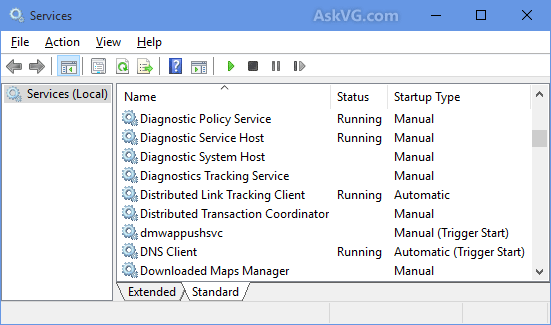
STEP 2: Services Manager shows a huge list of all Windows services along with their status and startup type. (select image to enlarge)

The Status section shows whether a service is currently running in background or not. The Startup Type section tells you whether a service is set to automatically start with Windows or not. The goal is to set some unnecessary services startup type to MANUAL so that they don't start automatically with Windows and thus don't consume system resources.
NOTE: It's recommended to set a service's startup type to MANUAL and not to DISABLED unless you are sure the service will never be needed. That's because if a service is set to MANUAL start and Windows needs the service, it'll be able to start the service and there will be no affect on OS functionality. But if a service is set to DISABLED and Windows requires that service, it won't be able to start the service and you may have problems.
Here are some services which can be safely set to MANUAL and often DISABLED:
  • Connected User Experiences and Telemetry (To turn off Telemetry and Data Collection) 
  • Diagnostic Policy Service
  • Diagnostic Tracking Service (To turn off Telemetry and Data Collection)
  • Distributed Link Tracking Client (If your computer is not connected to any network)
  • dmwappushsvc (To turn off Telemetry and Data Collection)
  • Downloaded Maps Manager (If you don't use Maps app)
  • IP Helper (If you don't use IPv6 connection)
  • Program Compatibility Assistant Service
  • Print Spooler (If you don't have a printer)
  • Remote Registry (You can set it to DISABLED for Security purposes)
  • Secondary Logon
  • Security Center
  • Touch Keyboard and Handwriting Panel Service (If you don't want to use the touch screen keyboard and handwriting features)
  • Windows Defender Service (If you don't use Windows Defender program)
  • Windows Error Reporting Service
  • Windows Image Acquisition (WIA) (If you don't have a scanner)
  • Windows Search (If you don't use Windows Search feature frequently)

Apart from the above services, you can also set a few other services startup type to MANUAL such as services installed by your graphics card driver (Intel, nVidia, AMD, etc), your sound card driver (Realtek, Creative, etc).

STEP 3: After configuring services startup type, close Services Manager and restart your computer for the changes to take effect.

If you have any issues with a software program, you can restore the services startup type to Automatic again using Services Manager to fix the issue.

Note: Be careful not to remove necessary services. Research the name when in doubt.

Credit: askvg.com

Improve Windows 10 Performance, Part 4 of 5

Remove Unwanted Programs from Windows Startup

There may be many unnecessary software programs which automatically start with Windows and keep running in the background. You can disable these programs from system startup to improve performance.

1. Right-click on the Taskbar and select the "Task Manager" option. You can also directly open the Task Manager by pressing the "Ctrl+Shift+Esc" keys together.

2. Go to the "Startup" tab and select the unwanted program in the list and click on the "Disable" button to remove it from startup. (You can disable more than one at a time.)

3. Restart your computer and the disabled program(s) will no longer start with Windows and you'll get a faster running system.

Note: Be careful not to remove necessary programs. Research the name when in doubt.

Credit: askvg.com

Improve Windows 10 Performance, Part 3 of 5

Disable Transparency on Start Menu, Taskbar and Action Center

Disabling transparency effects can also help in improving system performance. If you don't like the transparency effect on Windows 10 Start Menu, Taskbar and new Action (Notification) Center, you can turn the transparency effect off using these steps:

1. Open Settings app from Start Menu.

2. Go to the "Personalization -> Colors" page and set the option "Make Start, taskbar, and action center transparent" to Off.

This will immediately remove the transparency effect and make the Start Menu, Taskbar and Action Center opaque.

Note: Newer Windows 10 versions rename the option "Transparency effects".

Credit: askvg.com

Improve Windows 10 Performance, Part 2 of 5

Turn Off All Animations At Once

There is another way to turn off all animations in Windows 10. Follow these simple steps:

1. Open the Start Menu and click on Settings. Alternatively you can directly open Settings by pressing WIN+I keys together.

2. Go to the "Ease of Access -> Other options" page and set the option "Play animations in Windows" to Off.

It'll turn all animations off in Windows 10 which will improve your computer performance.

Credit: askvg.com

Improve Windows 10 Performance, Part 1 of 5

Disable Animations and Eye Candy Effects

By default, Windows 10 uses lots of animations and other effects, such as shadows, to provide an attractive user interface but these animations and effects can take up your system resources and can effect computer performance.

You can disable all of these animations and effects to improve Windows 10 performance using the following steps:

1. Press Win+R keys together to launch RUN dialog box. Type sysdm.cpl and press Enter. The System Properties window will open.

2. Go to Advanced tab and click on the Settings button under the Performance section.

3. In the Options window select Custom and uncheck the following:
  • Animate controls and elements inside windows
  • Animate windows when minimizing and maximizing
  • Animations in the taskbar
  • Fade or slide menus into view
  • Fade or slide ToolTips into view
  • Fade out menu items after clicking
  • Save taskbar thumbnail previews
  • Show shadows under mouse pointer
  • Show shadows under windows
  • Show translucent selection rectangle
  • Slide open combo boxes
  • Smooth-scroll list boxes
  • Use drop shadows for icon labels on the desktop

4. Apply the changes and close settings window.

Credit: askvg.com

Windows takes a page from Apple

Tech News and Views

I don't know how many of you have encountered the Windows S Mode, but I find it to be a real pain in the posterior. It comes on the Microsoft Surface and the HP Stream and many other systems. Users are forced to use the Edge browser, Bing and a lot of other proprietary programs.

Microsoft, in its infinite wisdom, has locked down Windows so that only apps from the Windows store will run on machines that come with the Windows S Mode installed. Sounds like Apple, doesn't it?

I tried installing Chrome, LibreOffice and even a new HP printer driver without success.

Users can have their S Mode computers converted to regular Windows Home, by signing in with a Microsoft account, but once the conversion is made, they can never go back. Frankly, I don't know why you would want to go back.

I guess it's time to switch to a Linux operating system.

Great way to measure true cell phone strength

Tech News and Views

The cell phone strength in Fairway Oaks is extremely low. Normally, I see just 1 bar on the phone, but I just read that the bars don't mean much and vary from phone to phone.

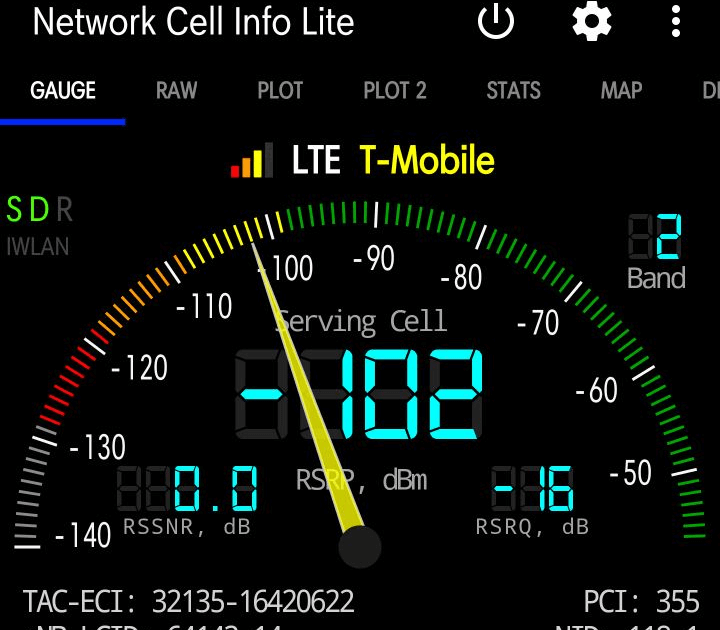
Here's a site that has great info on measuring cell phone strength. I downloaded one of the apps they suggested and found it very easy to use and very informative. It was Network Cell Info Lite. It is available for Android phones in the Google Play store.

The guide says: Once you have a dB reading, then you know just how good, average, or bad your signal strength is. -50 dB to -79 dB is very good signal. -80 dB to -99 dB is an average signal. -100 dB to -120 dB is below average or poor signal.


Executive Board Minutes


Computer Technology Club, Inc. – Executive Board Minutes
Mar 8, 2019

Alan Marcus, President, called the meeting to order at 9:00AM. Members in attendance: Bob Leiner, Jim Trimboli, Don Forgette, Bob Kenlay, Ron Kenyon, Bill Cahill, Linda Tingley and Alan Marcus.

Secretary’s report read by Bob Kenlay. No corrections or additions necessary.

Jim Trimboli read the Treasurer's Report. The current balance is $1370.39.

Future meeting topics:
Mar 20 - Managing Passwords by Nick Burke
Apr 17 - Spybot Anti-Beacon and Medical Alerts by Bob Kenlay
May 15 - One Drive and Windows Settings by Bob Kenlay
Don Forgette is reviewing the concept of “Cutting the Cord”. He will report on at a future board meeting as a possible club presentation.

The meeting adjourned at 9:40AM.

Respectfully submitted,
Bob Kenlay, Secretary

Great address book that's free

Tech News and Views

I have used many computer address books over the years, but here's the best one I have ever found, and the amazing thing about this one is that it is free.

Click on the link and then on the Free Edition tab to download the program.


One of the great features is the search option.  You can do a search on any terms that have been entered. If, for example, you entered the Oak Run neighborhoods, you could search for a particular one and the names of all of the people in the address book who live in that neighborhood will appear.

FBI Issues Warning To Parents About Smart Toys

The FBI's Internet Crime Complaint Center (IC3) has issued a PSA warning about the potential dangers of smart toys. The bureau encourages parents to consider cyber security before bringing internet-connect toys into the home because they could risk the privacy and safety of children.

The announcement warns of the potential for personal information to be gathered through such toys. The presence of sensors, microphones, cameras, data storage components, speech recognition and GPS, coupled with cloud storage of data, is cited as cause for concern, and parents are urged to check privacy agreements.

The IC3 warns: "Consumers should examine toy company user agreement disclosures and privacy practices, and should know where their family’s personal data is sent and stored, including if it’s sent to third-party services. Security safeguards for these toys can be overlooked in the rush to market them and to make them easy to use. Consumers should perform online research of these products for any known issues that have been identified by security researchers or in consumer reports."

There have already been several incidents around the world where smart toys have been hacked, or they have been banned because of vulnerabilities that could be exploited. The PSA does not hold back in stressing the potential dangers:
The features and functions of different toys vary widely. In some cases, toys with microphones could record and collect conversations within earshot of the device. Information such as the child’s name, school, likes and dislikes, and activities may be disclosed through normal conversation with the toy or in the surrounding environment. The collection of a child’s personal information combined with a toy’s ability to connect to the Internet or other devices raises concerns for privacy and physical safety. Personal information (e.g., name, date of birth, pictures, address) is typically provided when creating user accounts. In addition, companies collect large amounts of additional data, such as voice messages, conversation recordings, past and real-time physical locations, Internet use history, and Internet addresses/IPs. The exposure of such information could create opportunities for child identity fraud. Additionally, the potential misuse of sensitive data such as GPS location information, visual identifiers from pictures or videos, and known interests to garner trust from a child could present exploitation risks.
more of this post ▼

Dangers Of The Internet of Things (IoT)

Technology-filled smart homes have come a long way since Rosie the robot housekeeper catered to the Jetsons' needs. But one thing the Jetsons never seemed to worry about was Rosie turning on them or being used as a surveillance device.

Smart home mishaps can and do happen. Just ask the German computer science professor who rigged up his house so that everything from lights, music, and TV to heating and cooling was connected to the Internet and could be turned on and off remotely. Sounds great, right? Until the house froze up and stopped responding to his commands.

Was a nefarious hacker to blame? No, the culprit was a light fixture that had burned out and was trying to gain the hub's attention by sending continuous requests that overloaded the network, a classic denial-of-service (DOS) attack.

The professor knew his way around a network and was able to diagnose the problem himself, but are all the consumers of smart home technology -- expected to become a $12 billion annual business by 2020 -- so tech savvy?

Not all solutions to smart home snafus are as simple as changing a light bulb. And millions of Internet-connected devices flooding the market and our homes are less secure than a PC or smartphone. As Daniel Buentello said in a Black Hat tech session in which he needed just 15 seconds to break in and gain remote control over a Nest thermostat: "The more convenient or smart something is, the less secure it is. What are we giving up just for me to be lazy on my couch?"

 more of this post ▼

10 Tips For Better And Faster Search Results

The problem with search engines isn't that they don't
find the info you want but that they find too much info.

How do search engines work?
Search engines put together a database of sites by sending "spiders" or "robots" to crawl through the Web, going from link to link. When spiders get to a website, they index most of the words on the available pages. When you use a search engine, the engine scans its database of sites to match your keywords to those same words in page locations of the database.

Search Tip #1:
Be specific. The more narrowed down you can get your searches from the beginning, the more successful your search usually will be. For example, if you were searching for coffee, you'd get way more results back than you could use. However, if you narrowed that down to roasted Arabica coffee in Detroit Michigan, you'd be more successful.

Search Tip #2:
One thing that can save you search time is very simple - put your search phrase in quotes.

When you use quotation marks around a phrase, you are telling the search engine to only bring back pages that include these search terms exactly how you typed them in order, proximity, etc. This tip works in almost every search engine and is very successful in bringing back focused results. If you're looking for an exact phrase, put it in quotes. Otherwise, you'll come back with a huge jumble of results.

Here's an example: "long haired cats". Your search will come back with these three words in proximity to each other and in the order you intended them to be.

Search Tip #3:
Another simple trick is using addition and subtraction to make your search results more relevant.

For example, if you're searching for Tom Ford, but you get lots of results for Ford Motors, just combine a couple of web search basics to get better results: "tom ford" -motors. Now your results will come back without all those pesky car results.

more of this post ▼

Executive Board Minutes


Computer Technology Club, Inc. – Executive Board Minutes
February 8, 2019

Alan Marcus, President, called the meeting to order at 9:00AM. Members in attendance: Bob Leiner, Bill Balch, Jim Trimboli, Don Forgette, Bob Kenlay, Ron Kenyon, Bill Cahill and Alan Marcus.

Secretary’s report read by Bob Kenlay. No corrections or additions necessary.

Jim Trimboli read the Treasurer's Report. The current balance is $1319.39.

Jim Trimboli reported that 39 members paid their dues last month. The Federal annual forms are now complete.

Bill Balch, Jim Trimboli, Don Forgette maned the Club Fair on January 23rd. Bill Balch reported that several people stopped by and had some interest in the club.

Future meeting topics:
Feb 20   "Be Aware of These Scams" by Sgt. Paul Bloom from the Sheriff's Office
Mar 20   "Managing Passwords" by Nick Burke
Apr 17   "Spybot Anti-Beacon, Medical Alerts, & One Drive" by Bob Kenlay

Don Forgette is reviewing the concept of “Cutting the Cord”. He will report on it at a future board meeting as a possible club presentation.

The meeting adjourned at 9:40AM.

Respectfully submitted,
Bob Kenlay, Secretary

LABELS INDEX:

* (5) 2038 Problem (1) 3G - Goodbye (1) 5G (2) Abine Blur (1) Activation Lock (1) ADAS (1) Add sound to Impress (2) Address Book (1) AirTags (3) Amazon (3) Android (2) Android phone (2) Annoying Ads (1) Anti-Virus (1) App Store (1) Apple Bytes-2019 (12) Apple Bytes-2020 (19) Apple Bytes-2021 (13) Apple Bytes-2022 (10) Apple Bytes-2023 (11) Apple Glass (1) Apple Maps (1) Apple Repair (2) Apple Support (2) Apple TV (1) Apple Watch (6) Archives of CTC (7) ARM M1 Processor (1) Attachments (1) Audio Files (1) Autonomous (1) Avast (1) Backups (3) Bank-fraud (1) Battery Icon (1) Battery life (4) Battery Replacement (1) BCC (1) Best Buy (1) Big Data Mining (1) Big Sur (1) Bloatware (1) Board Minutes 2019 (12) Board Minutes 2020 (12) Board Minutes 2021 (12) Board Minutes 2022 (12) Board Minutes 2023 (12) Board Minutes 2024 (2) Boom Supersonic (1) Browser Attack (1) Browser Settings (1) Browser Tabs (1) browsers (1) Cache (1) Camera App (1) Caps Lock Indicator (1) Car charging (1) Car Door Lock (1) Cell phone strength (1) Cell Phones (1) Charge Cycles (1) Chevy Bolt (2) Chrome browser (2) Chromecast (1) Clone vs Image (1) Cloud Computing (1) Colorado (1) Construction (1) Contact Removal (1) Converting CDs (1) coronavirus (1) Coupons (1) COVID-19 (1) Covid-19 Detection (1) CPAP Recall (1) CTC 2023 ISP Survey (1) Customer Support (1) Dash Cams (1) Default browser (1) Delete Apps (2) Digital Estate Planning (1) Disable Thumbnails (1) Disk image (2) DogWalk malware (1) Domino's (1) Download Videos (1) Drive Partition (1) Driver Assistance (1) Drones (3) Drywall (1) DuckDuckGo (4) E-bikes (1) E.A.S.Y Pay (1) ebooks (1) Edge (1) Edge Browser (4) EdgeDeflector (1) Electric Bicycles (2) Electric car batteries (1) Electric Cars (6) Electric Trucks (1) email (1) Email Aliases (1) EV (13) EV Charging (1) External Storage (1) Facebook (4) FaceTime (3) Fake Reviews (1) Fast Charging (1) FBI Warning (1) Fiber Optic Cable (1) FIDO (1) File & Folder Icons (1) Firefox (2) Firefox Relay (1) Fitbit (1) Force Quit (1) Future Tech (1) Gmail (2) Gmail Contact (1) Googerteller App (1) Google (1) Google Maps (1) Google Music (1) Google Play Store (1) Google Search (1) Google TV (1) Group Text (1) Hacking (3) Harley-Davidson (1) Headlights (1) Healthcare (1) ID.4 (1) Identify Music (1) Image vs Clone (1) iMessage (2) Incognito Mode (1) Instagram (1) Intel Drivers (1) Internet Explorer (1) Internet of Things (1) Internet speed (1) iOS 13 (1) iOS 14 (2) iOS 15 (2) iPad (5) iPad Air (1) iPadOS 15 (2) iPhone (16) iPhone 12 (1) iPhone Battery (2) iPhone SE (1) iPod Touch (1) ISO Files (1) ISP Down? (1) Karen's Replicator (1) Keyboard (1) keyboard shortcuts (2) LibreOffice (1) LibreOffice Impress (1) Linux Mint 19.2 (1) Lithium-Iron Phosphate (1) M2 Processor (1) Mac (1) Mac Tips (10) MacBook Air (2) macOS (4) Magnifier (1) Mail App (1) Malware (4) Mars (1) Masked Email (1) meetings (6) Microcomb (1) Microsoft (1) Mirroring Tips (1) Mobile Wi-Fi Hotspot (1) Mouse Speed (1) MyHealtheVet (1) NASA (1) Norton (1) old computers (1) OneDrive (1) Ookla (1) Oregon (1) Oura Rings (1) Outlook (1) Parallels 18 (1) passwords (1) PDF (1) PDF Editing (1) Phishing Scams (1) Phone Data Swap (1) Phone Scams (1) Plug & Charge (1) Pop-Up Blocker (1) Portable EV Chargers (1) print spooler (1) Printer problem (1) printers (2) Privacy (5) Privacy Settings (1) Private Browsing (1) Pro Pilot (1) RAM (1) RAM 1500 REV Pickup (1) Range anxiety (2) Range Extended Vehicle (1) Ransomware (3) Rebooting (1) Recharge Cycles (1) Remote control (1) Robots (1) Roomba robots (1) Router (3) Samsung Drive Storage (1) Samsung Gallery Sync (1) Scams (1) SD Cards (1) Search Engines (3) Search Tips (1) Secret Button (1) Security Flaw (1) Security Key (1) Security Warning (1) Sharing From Phone (1) Short Codes (1) Show Wi-Fi Password (1) Signal Strength (1) Sion (1) Siri (1) SkyDrive (1) Slide Over (1) Slow Internet (1) Smart Glasses (1) Smart Home (1) Smart Toys (1) Smartwatch (1) Solar-powered EV (1) Sono Motors (1) Speed Wars (1) Split Screen (1) Split View (1) Spreadsheets (1) Spy Pixel (1) Start Up (1) Startpage (1) Streaming (1) Streaming Services (1) Street View (1) Surface Duo (1) Surface Earbuds (1) System Tray (1) Tab Syncing (1) Tbps (1) Teams (1) Technology Channels (1) Telegram app (1) Tesla (6) Tesla Adapter (1) Tesla Model 3 (1) Texting (1) Tracking (1) Tracking Pixel (1) Two-Factor Authentication (2) Undo Send (1) Unlock Phone (1) Update problems (1) USB drive (1) USPS Informed Delivery (1) VA access (1) Verizon (1) Vertical TV (1) Video Conferencing (1) Videos (3) Voice Assistant (1) Vultur (1) VW (1) Web Beacon (1) WhatsApp (1) wi-fi (2) Wi-Fi Hotspot (1) Widgets (1) Win 10 Performance (5) Windows (1) Windows 10 (9) Windows 10 Tips & Tricks (1) Windows 11 (8) Windows 7 (1) Windows S Mode (1) Windows Update (1) Windows update problem (1) Wink (1) Winstall (1) Yahoo mail (1) Yippy (1) You've Been Hacked (1) YouTube (1) Zero Emissions (1) Zoom (2)