Pages

Improve Windows 10 Performance, Part 5 of 5

Remove Unwanted Services from Windows Startup

STEP 1: Open the Services Manager using one of the following:

1.a. Press the WIN+X keys together to show the quick access menu and select the "Computer Management" option. Next select "Services and Applications -> Services" in the left panel.

1.b. Or right-click "This PC" icon on the Desktop and select the "Manage" option.

1.c. Or press WIN+R keys together to launch the RUN dialog box and type services.msc and press Enter. It'll directly open the Services Manager.
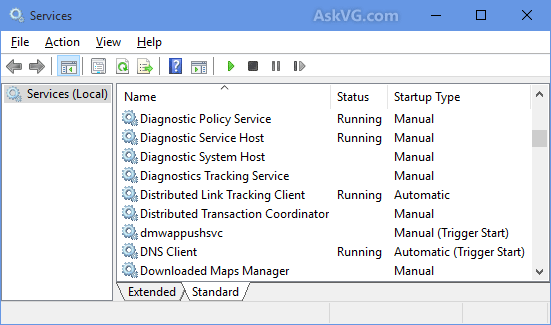
STEP 2: Services Manager shows a huge list of all Windows services along with their status and startup type. (select image to enlarge)

The Status section shows whether a service is currently running in background or not. The Startup Type section tells you whether a service is set to automatically start with Windows or not. The goal is to set some unnecessary services startup type to MANUAL so that they don't start automatically with Windows and thus don't consume system resources.
NOTE: It's recommended to set a service's startup type to MANUAL and not to DISABLED unless you are sure the service will never be needed. That's because if a service is set to MANUAL start and Windows needs the service, it'll be able to start the service and there will be no affect on OS functionality. But if a service is set to DISABLED and Windows requires that service, it won't be able to start the service and you may have problems.
Here are some services which can be safely set to MANUAL and often DISABLED:
  • Connected User Experiences and Telemetry (To turn off Telemetry and Data Collection) 
  • Diagnostic Policy Service
  • Diagnostic Tracking Service (To turn off Telemetry and Data Collection)
  • Distributed Link Tracking Client (If your computer is not connected to any network)
  • dmwappushsvc (To turn off Telemetry and Data Collection)
  • Downloaded Maps Manager (If you don't use Maps app)
  • IP Helper (If you don't use IPv6 connection)
  • Program Compatibility Assistant Service
  • Print Spooler (If you don't have a printer)
  • Remote Registry (You can set it to DISABLED for Security purposes)
  • Secondary Logon
  • Security Center
  • Touch Keyboard and Handwriting Panel Service (If you don't want to use the touch screen keyboard and handwriting features)
  • Windows Defender Service (If you don't use Windows Defender program)
  • Windows Error Reporting Service
  • Windows Image Acquisition (WIA) (If you don't have a scanner)
  • Windows Search (If you don't use Windows Search feature frequently)

Apart from the above services, you can also set a few other services startup type to MANUAL such as services installed by your graphics card driver (Intel, nVidia, AMD, etc), your sound card driver (Realtek, Creative, etc).

STEP 3: After configuring services startup type, close Services Manager and restart your computer for the changes to take effect.

If you have any issues with a software program, you can restore the services startup type to Automatic again using Services Manager to fix the issue.

Note: Be careful not to remove necessary services. Research the name when in doubt.

Credit: askvg.com

No comments:

LABELS INDEX:

* (5) 2038 Problem (1) 3G - Goodbye (1) 5G (2) Abine Blur (1) Activation Lock (1) ADAS (1) Add sound to Impress (2) Address Book (1) AirTags (3) Amazon (3) Android (2) Android phone (2) Annoying Ads (1) Anti-Virus (1) App Store (1) Apple Bytes-2019 (12) Apple Bytes-2020 (19) Apple Bytes-2021 (13) Apple Bytes-2022 (10) Apple Bytes-2023 (11) Apple Glass (1) Apple Maps (1) Apple Repair (2) Apple Support (2) Apple TV (1) Apple Watch (6) Archives of CTC (7) ARM M1 Processor (1) Attachments (1) Audio Files (1) Autonomous (1) Avast (1) Backups (3) Bank-fraud (1) Battery Icon (1) Battery life (4) Battery Replacement (1) BCC (1) Best Buy (1) Big Data Mining (1) Big Sur (1) Bloatware (1) Board Minutes 2019 (12) Board Minutes 2020 (12) Board Minutes 2021 (12) Board Minutes 2022 (12) Board Minutes 2023 (12) Board Minutes 2024 (2) Boom Supersonic (1) Browser Attack (1) Browser Settings (1) Browser Tabs (1) browsers (1) Cache (1) Camera App (1) Caps Lock Indicator (1) Car charging (1) Car Door Lock (1) Cell phone strength (1) Cell Phones (1) Charge Cycles (1) Chevy Bolt (2) Chrome browser (2) Chromecast (1) Clone vs Image (1) Cloud Computing (1) Colorado (1) Construction (1) Contact Removal (1) Converting CDs (1) coronavirus (1) Coupons (1) COVID-19 (1) Covid-19 Detection (1) CPAP Recall (1) CTC 2023 ISP Survey (1) Customer Support (1) Dash Cams (1) Default browser (1) Delete Apps (2) Digital Estate Planning (1) Disable Thumbnails (1) Disk image (2) DogWalk malware (1) Domino's (1) Download Videos (1) Drive Partition (1) Driver Assistance (1) Drones (3) Drywall (1) DuckDuckGo (4) E-bikes (1) E.A.S.Y Pay (1) ebooks (1) Edge (1) Edge Browser (4) EdgeDeflector (1) Electric Bicycles (2) Electric car batteries (1) Electric Cars (6) Electric Trucks (1) email (1) Email Aliases (1) EV (13) EV Charging (1) External Storage (1) Facebook (4) FaceTime (3) Fake Reviews (1) Fast Charging (1) FBI Warning (1) Fiber Optic Cable (1) FIDO (1) File & Folder Icons (1) Firefox (2) Firefox Relay (1) Fitbit (1) Force Quit (1) Future Tech (1) Gmail (2) Gmail Contact (1) Googerteller App (1) Google (1) Google Maps (1) Google Music (1) Google Play Store (1) Google Search (1) Google TV (1) Group Text (1) Hacking (3) Harley-Davidson (1) Headlights (1) Healthcare (1) ID.4 (1) Identify Music (1) Image vs Clone (1) iMessage (2) Incognito Mode (1) Instagram (1) Intel Drivers (1) Internet Explorer (1) Internet of Things (1) Internet speed (1) iOS 13 (1) iOS 14 (2) iOS 15 (2) iPad (5) iPad Air (1) iPadOS 15 (2) iPhone (16) iPhone 12 (1) iPhone Battery (2) iPhone SE (1) iPod Touch (1) ISO Files (1) ISP Down? (1) Karen's Replicator (1) Keyboard (1) keyboard shortcuts (2) LibreOffice (1) LibreOffice Impress (1) Linux Mint 19.2 (1) Lithium-Iron Phosphate (1) M2 Processor (1) Mac (1) Mac Tips (10) MacBook Air (2) macOS (4) Magnifier (1) Mail App (1) Malware (4) Mars (1) Masked Email (1) meetings (6) Microcomb (1) Microsoft (1) Mirroring Tips (1) Mobile Wi-Fi Hotspot (1) Mouse Speed (1) MyHealtheVet (1) NASA (1) Norton (1) old computers (1) OneDrive (1) Ookla (1) Oregon (1) Oura Rings (1) Outlook (1) Parallels 18 (1) passwords (1) PDF (1) PDF Editing (1) Phishing Scams (1) Phone Data Swap (1) Phone Scams (1) Plug & Charge (1) Pop-Up Blocker (1) Portable EV Chargers (1) print spooler (1) Printer problem (1) printers (2) Privacy (5) Privacy Settings (1) Private Browsing (1) Pro Pilot (1) RAM (1) RAM 1500 REV Pickup (1) Range anxiety (2) Range Extended Vehicle (1) Ransomware (3) Rebooting (1) Recharge Cycles (1) Remote control (1) Robots (1) Roomba robots (1) Router (3) Samsung Drive Storage (1) Samsung Gallery Sync (1) Scams (1) SD Cards (1) Search Engines (3) Search Tips (1) Secret Button (1) Security Flaw (1) Security Key (1) Security Warning (1) Sharing From Phone (1) Short Codes (1) Show Wi-Fi Password (1) Signal Strength (1) Sion (1) Siri (1) SkyDrive (1) Slide Over (1) Slow Internet (1) Smart Glasses (1) Smart Home (1) Smart Toys (1) Smartwatch (1) Solar-powered EV (1) Sono Motors (1) Speed Wars (1) Split Screen (1) Split View (1) Spreadsheets (1) Spy Pixel (1) Start Up (1) Startpage (1) Streaming (1) Streaming Services (1) Street View (1) Surface Duo (1) Surface Earbuds (1) System Tray (1) Tab Syncing (1) Tbps (1) Teams (1) Technology Channels (1) Telegram app (1) Tesla (6) Tesla Adapter (1) Tesla Model 3 (1) Texting (1) Tracking (1) Tracking Pixel (1) Two-Factor Authentication (2) Undo Send (1) Unlock Phone (1) Update problems (1) USB drive (1) USPS Informed Delivery (1) VA access (1) Verizon (1) Vertical TV (1) Video Conferencing (1) Videos (3) Voice Assistant (1) Vultur (1) VW (1) Web Beacon (1) WhatsApp (1) wi-fi (2) Wi-Fi Hotspot (1) Widgets (1) Win 10 Performance (5) Windows (1) Windows 10 (9) Windows 10 Tips & Tricks (1) Windows 11 (8) Windows 7 (1) Windows S Mode (1) Windows Update (1) Windows update problem (1) Wink (1) Winstall (1) Yahoo mail (1) Yippy (1) You've Been Hacked (1) YouTube (1) Zero Emissions (1) Zoom (2)